

Table of Contents
If you want to buy from Apple and ship to Malaysia, you need to know that Apple’s US store does not ship directly to Malaysia, but with the help of a US package forwarding service like Global Shopaholics, you can order the latest Apple devices and get them delivered reliably to your Malaysian doorstep. This guide will walk you through buying from the Apple US store, shipping options, costs, import rules, and everything a Malaysian shopper needs to know to receive Apple products from the US.
Quick Guide: How to Buy from Apple and Ship to Malaysia
- Apple US Store does not deliver directly to Malaysia. You need a package forwarding solution.
- Get a free US address from Global Shopaholics to receive Apple products at their US warehouse.
- Order on Apple.com USA and ship to your Global Shopaholics address.
- Choose your delivery options: DHL, FedEx, UPS, and more from USA to Malaysia.
- Handle local customs, duties, and electronics import rules for Malaysia.
Why Can’t You Ship Apple US Orders Directly to Malaysia?
Many Malaysians would love to buy the latest iPhone, MacBook, or iPad from the US Apple store to take advantage of pricing, availability, or exclusive US-only customizations. However, the Apple US online store only ships to US addresses. If you try to check out with a Malaysian address, Apple’s system will not let you proceed to shipping. This makes it challenging for international buyers who want specific US Apple configurations or faster product releases.
Shipping restrictions are not unique to Apple—most big US retailers follow similar policies. That’s why Malaysian shoppers interested in purchasing goods from US stores like Amazon, eBay, Walmart, or Costco also need clever solutions for international shipping.
However, there is a reliable workaround: use a US package forwarding service that provides you a USA address, receives your order, and then ships it onward to Malaysia.
What Malaysian Shoppers Need to Know Before Ordering Apple from the US
Not every Apple product sold in the US is automatically available for shipping to Malaysia. Here are key points Malaysian buyers must consider before placing an Apple order for international shipping:
- The US Apple site requires a valid US address at checkout. Non-US addresses are not accepted.
- Some Apple products may have regional restrictions, differences in power adapters, or warranty limitations outside the US.
- Malaysian customs may require certifications or have restrictions on certain electronics or batteries.
- Shipping costs can add substantially to your total order, especially for larger devices (MacBook, iMac).
- You will need to pay Malaysian import taxes and duties upon arrival.
- Returns and after-sales support may differ for US models sent internationally.
- Availability of new models may be faster in the US than in Malaysia, so timing your order is important, especially around big launch events.
Apple Product Compatibility and Availability for Malaysia Shipments
Before placing your US Apple order, check the following:
- Device Specs: US Apple Store may offer exclusive colors, storage options, or early access. But power plugs and network compatibility (like 5G/4G bands) may differ from Malaysian versions.
- Warranty: Most Apple products come with a standard international warranty, but some repairs or replacements may only be honored in the country of purchase.
- Product Restrictions: Items with lithium batteries, certain configurations, or high-value items may have extra shipping or customs requirements.
- Order Limits: Limits may apply on the number of devices, especially for new launches.
Always check current Apple and Malaysian customs rules, as shipping and import restrictions can change based on the product, value, and regulations.
Step-by-Step: How to Buy from Apple and Ship to Malaysia
Here’s the practical way Malaysian shoppers purchase the latest Apple products from the US and get them delivered using Global Shopaholics. This method is trusted by international shoppers who want exclusive US devices, customizations, or early releases unavailable locally.
Step 1: Sign Up for a Free Global Shopaholics Account
Get a tax-free USA address for Apple product shipping in the Delaware warehouse. Sign up now. 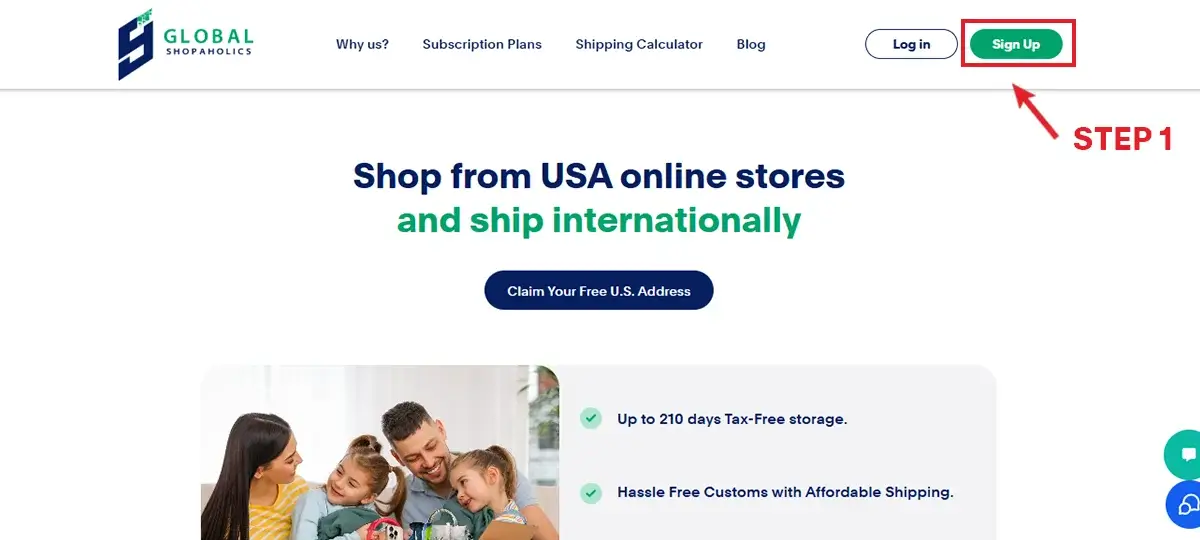
Step 2: Shop at Apple USA
Browse the Apple USA website for the latest iPhones, MacBooks, or Apple Watches. Pick your desired model, customize it if needed, and add it to your bag. 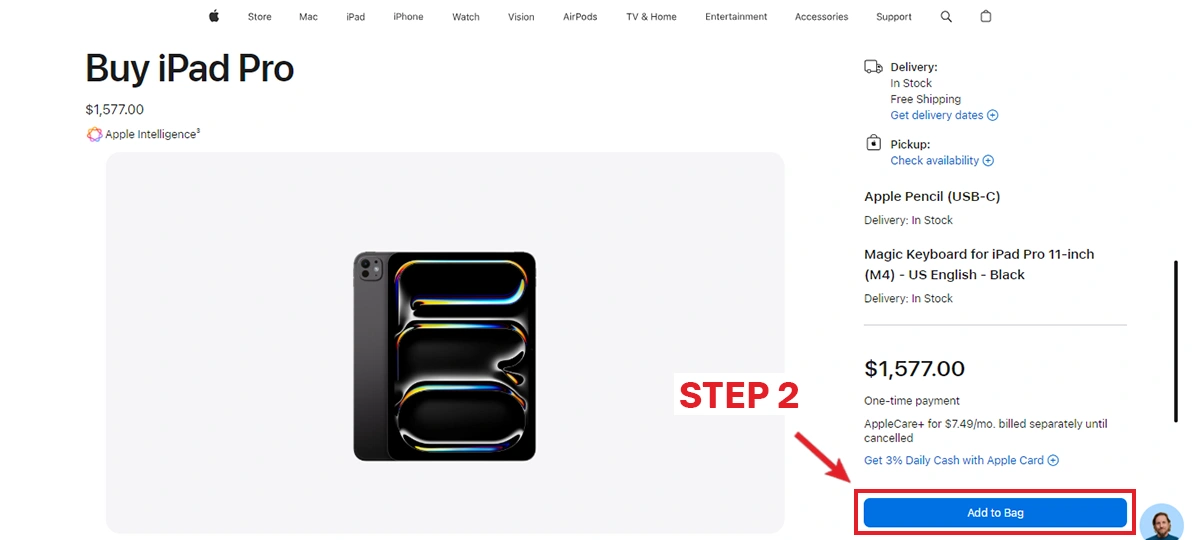
Step 3: Use Your Global Shopaholics Address at Checkout
At checkout, enter your unique Global Shopaholics address with your unique suite number. Your Apple products will be shipped to our secure Delaware warehouse for processing. 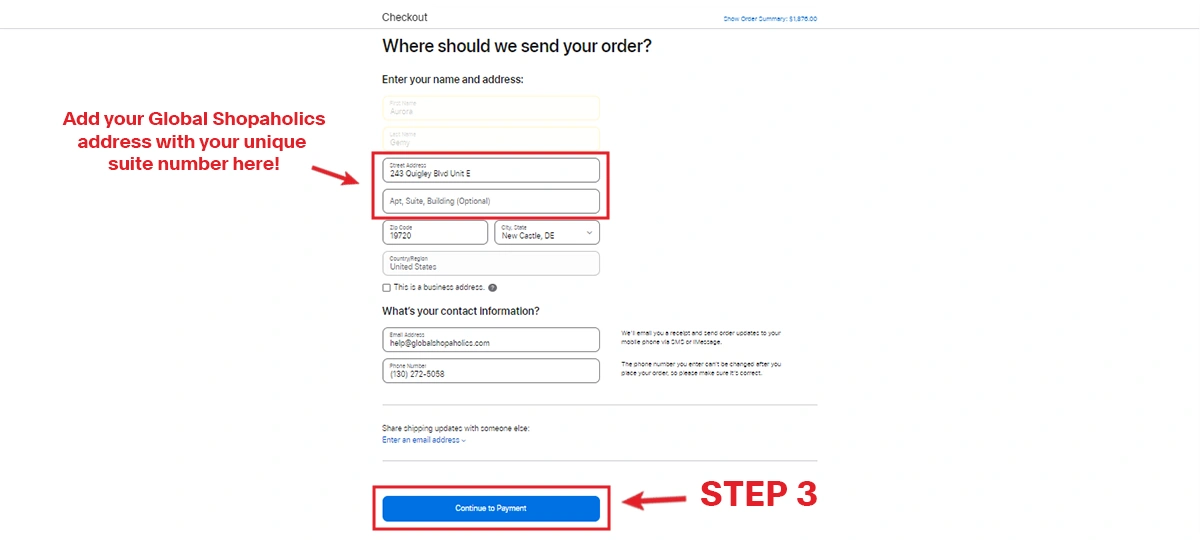
Step 4: Consolidate and Choose a Shipping Method
Use our Package Consolidation service, which combines multiple packages into one shipment, to save up to 80% on shipping costs. Use our shipping calculator to choose from trusted couriers like DHL, FedEx, or UPS for fast, reliable delivery. 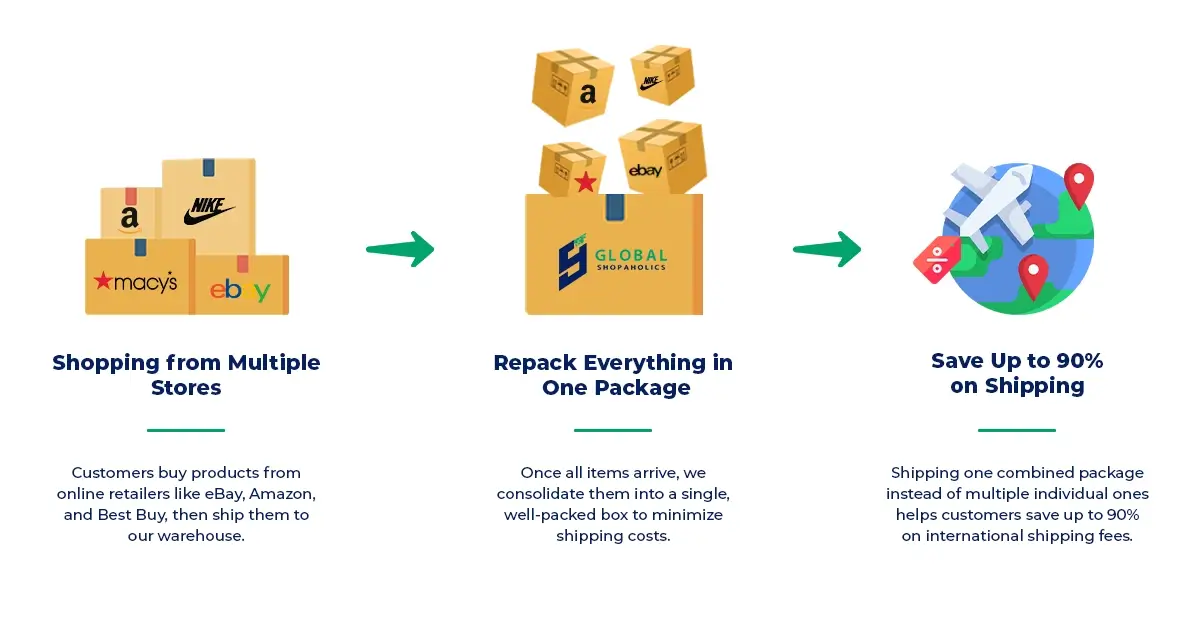
Track and Receive Your Apple Products
Track your shipment in real-time via our dashboard and rely on our customs expertise for smooth delivery. Your Apple products will arrive safely, ready to enjoy!
Order Apple Products from USA to Malaysia: What to Expect for Shipping, Costs, and Customs
After your Apple order arrives at your US forwarding address, here’s what happens next as you arrange package forwarding to Malaysia:
Choosing the Right Shipping Method from USA to Malaysia
- Express Air (DHL, FedEx, UPS): Typically the fastest and most secure for electronics, with delivery from US to Malaysia in as little as 3-7 business days.
- Economy or Standard Air: Lower cost options, but may take over a week and include fewer tracking updates.
- Freight or Cargo: Used for very large or bulk orders; usually not necessary for a single device but available.
Use the shipping calculator to estimate rates and select your preferred delivery option.
Shipping Apple Devices from US to Malaysia: Cost Breakdown
- USA Domestic Shipping: Apple typically offers free shipping within the US to your forwarding address.
- US to Malaysia Shipping Fee: Actual cost depends on the package’s size, weight, total value, and courier choice (DHL, FedEx, UPS, etc.)
- Package Consolidation: Multiple Apple devices (or other products) can be combined to reduce overall volume and shipping price. Learn about consolidation.
- Assisted Purchase: If your Malaysian credit card is not accepted at Apple.com, use Assisted Purchase service—Global Shopaholics will buy on your behalf (with applicable service fees).
- Malaysian Import Duties & Taxes: Collected by Malaysian customs after arrival. The rate depends on product category and value. Apple products are subject to local GST and possibly handling fees.
It’s best to refer to the Malaysian customs website for the latest electronics import tax rates, as these can change. Prepare to pay at delivery or the nearest customs office, as required.
Customs, Duties, and Restricted Items for Malaysia
- Declare the correct value and product details to avoid issues with customs clearance.
- Lithium batteries and bulk electronics shipments will be inspected and may require extra paperwork.
- Global Shopaholics offers customs support and guidance, but final decisions are made by Malaysian customs authorities.
Always check whether the exact Apple device configuration you’re buying is fully legal and supported for import in Malaysia.
Package Forwarding and Consolidation: Save on US to Malaysia Shipping
When ordering several items—or if you want to buy accessories and devices together—consider package consolidation. Instead of shipping multiple boxes, Global Shopaholics can combine your packages into one efficient shipment, dramatically lowering your total shipping costs. You get photos of your packages, can store them for multiple days, and choose when and how to ship them onward to Malaysia.
This is especially useful if you want to buy iPhones, MacBooks, Apple Watch, or other tech accessories from the US Apple Store or other US online retailers. With US forwarding service to Malaysia, you can shop hundreds of US stores—not just Apple—and ship them all together.
Common Problems When Ordering Apple from the US to Malaysia (and How to Solve Them)
- Payment declined: Some Malaysian credit cards may be rejected by Apple.com (USA billing required). Use the Assisted Purchase service here.
- Address issues: Always enter your precise Global Shopaholics US address and suite number during Apple’s checkout process.
- Product restrictions: Double-check Apple’s terms for purchasing certain models or high-value items from the US store.
- Import taxes surprise: Remember that Malaysia will collect GST and/or duties on imported electronics.
- Tracking or shipping damage: Use a trusted courier and insurance for higher value Apple purchases.
- Warranty questions: For repairs or replacements, you may need to ship the device back to the US or check if Malaysia Apple stores will honor international warranty.
Comparison Table: Direct Shipment vs. Package Forwarding (for Apple Orders to Malaysia)
| Option | Available for Apple US Orders? | Pros | Cons |
|---|---|---|---|
| Apple US Direct Shipment to Malaysia | No | Simplest if available | Not offered; cannot use Malaysian address |
| Package Forwarding (Global Shopaholics) | Yes | Access US-only devices/models, address acceptance, package consolidation, multiple shipping choices | Requires extra steps and possible customs clearance |
Checklist: Steps to Import Apple Products to Malaysia
- Sign up for a free US address at Global Shopaholics Malaysia.
- Check Apple.com US for your desired model and available configurations.
- Decide if you need Assisted Purchase: can your payment method buy on Apple.com?
- Use your US address at checkout. Include all suite or box numbers.
- Track your delivery to the US warehouse (photos available via dashboard).
- Consolidate packages to save money (recommended if buying more than one item).
- Choose a suitable shipping method to Malaysia and get a live quote.
- Prepare to pay Malaysian import taxes and duties. Check latest rates here.
- Track your international shipment with real-time updates until delivery.
FAQs: Buy from Apple and Ship to Malaysia
No, the Apple US online store does not offer delivery to Malaysia. You must use a US package forwarding service like Global Shopaholics to receive your purchases in Malaysia.
Sign up for a US shipping address with Global Shopaholics, order from the Apple US site using that address, and then arrange international shipping from the forwarding warehouse to Malaysia. See the full step-by-step guide above.
Yes, regulations can change. Restrictions may apply for lithium batteries, device types, or model-specific import rules. Double-check Apple, courier, and Malaysian customs regulations before shipping.
Shipping costs depend on package size, weight, product value, and courier choice. Use the Global Shopaholics shipping calculator for an instant quote. Don’t forget to factor in Malaysian import duties and GST.
Using a US package forwarding service like Global Shopaholics is the best way. You get a US address, package consolidation, tracking, and support for customs clearance—making the process seamless for Malaysian shoppers.
Your Next Step: Buy from Apple US, Ship Confidently to Malaysia
Buying from Apple and shipping to Malaysia may seem complex, but with the right information and a reliable forwarding partner, it’s entirely achievable. Whether you want the latest iPhone before it launches in Malaysia, a MacBook Pro in a US-exclusive configuration, or an Apple Watch edition unavailable locally, the process is straightforward when you know the steps. Use this guide to plan your purchase, understand shipping options, and avoid surprises with Malaysian import rules.
Ready to get your favorite Apple products shipped to Malaysia? Sign up with Global Shopaholics to access a US address, package forwarding, and reliable delivery for your next Apple purchase.

